
The TwinSpace is the project’s safe platform where project’s members (both teachers and pupils) work together.
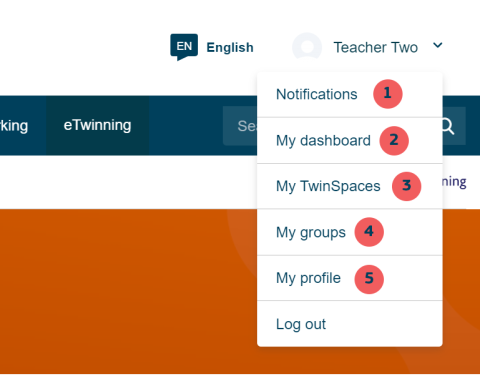
Teachers and invited guests need to have an account in the European School Education Platform (the Platform) and can access their TwinSpace, after logging into the Platform. They can do so from the menu which opens by clicking on their name on the top right bar and then selecting “My TwinSpaces” (3).
eTwinners with only one TwinSpace will be automatically directed to its homepage. Teachers with more than one TwinSpaces will be directed to the “My TwinSpaces” landing page which shows some basic information about:
● Open TwinSpaces(if the project is open, the TwinSpace is open)
● Archived TwinSpaces (if a TwinSpace is archived, it can be seen in read-only mode)
● Closed TwinSpaces(project can be closed from the “My projects” page by clicking on the three dots on the project box. When a project is closed, the TwinSpace is automatically closed)
Pupils do not have a Platform account and they can only login to the project’s TwinSpace from the following page: school-education.ec.europa.eu/pupil-login